




かな
老舗和菓子屋19代目が作る季節の絶品大福
KIKYOYA ORII さん
駒沢大学駅から徒歩1〜2分のところにあり、
木の温もりを感じる外観🌿
扉を開けた瞬間から木のいい香りがして、
美しい餅菓子が✨
江戸時代から続く三重県の老舗和菓子屋
19代目中村さんが手掛けられてるお店🍵
こだわりとして、朝つきたてのお餅を使い、
こし餡はお餅に合うように有名な @ki_no_an さんの
あんこを使用されているそう🫘
私が今回いただいたのは💁♀️
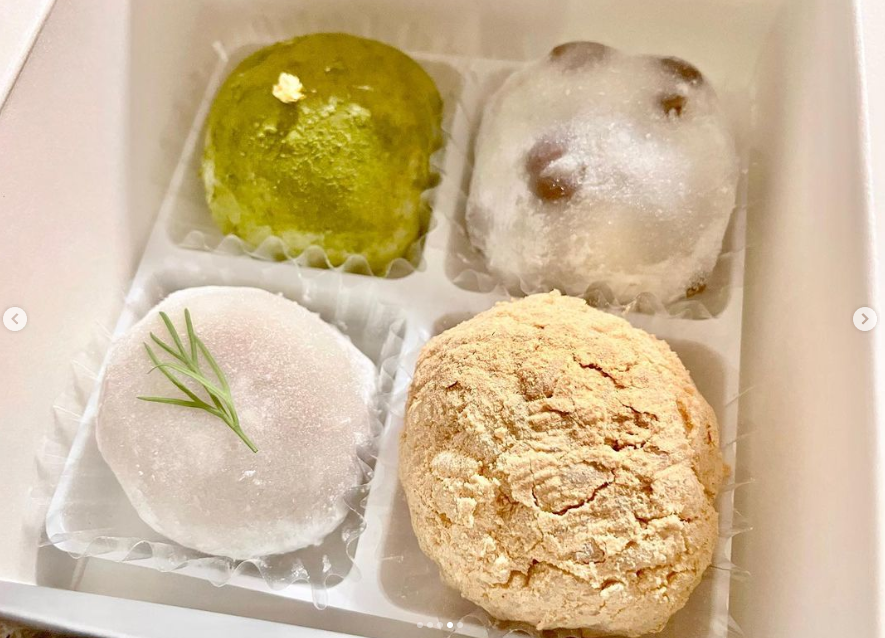
・19代目の豆大福(こし餡) ¥330
納得の看板商品😭
一番感動しました✨
柔らかいお餅と甘すぎない上品なあんこがぴったり!
・きなこおはぎ(こし餡) ¥300
きなこ好きは是非食べてほしい1品です♡
・濃茶大福 ¥380
宇治抹茶と白餡の組み合わせが素晴らしい🌿
中にはなんとホワイトチョコが!
甘くて美味しかったです♡
・白無花果とマスカルポーネの大福 ¥480
お酒に合う大福として作られた1品!
ラム酒につけてあるドライ無花果と白餡が
大人の味でとっても美味しかったです✨
その他フルーツ大福など
都度変わる季節ものがあるので
何度行っても楽しめます☺️
こだわって作られてるので消費期限は当日中👌
手土産や自分へのご褒美にぴったり♪
次伺う際は、駒沢公園でのピクニック用で
買おうかなとか思います👀💕
この記事を書いてる人
RETRIP第1期公式インフルエンサー🐘公式アンバサダー。甘いものが大好きで女性からの支持も多い人気インスタグラマーでもある。
ぐるこみ運営陣の一人でもあり、仕事に対して積極的な姿勢は男性スタッフからも評価されるメンバー。インスタグラムはコチラへ。
レビュー
1927
ремонт посудомоечных машин в москве
Сервисное обслуживание посудомоечного оборудования в Московском регионе поможет в кратчайшие сроки устранить любые неисправности . Наши опытные мастера готовы выехать в любой район города , с целью выявления точной причины поломки. Ремонт производится с использованием фирменных деталей, что позволяет давать длительную гарантию на услуги. При возникновении протечек или постороннего шума лучше доверить ремонт проверенным мастерам. У нас установлены лояльные тарифы , и большинство заявок закрывается непосредственно в день вызова. Оставьте заявку на восстановление вашей техники , и забудьте о проблемах с грязными тарелками .
срочный ремонт посудомоечных машин в москве [url=http://remont-posudomoechnyh-mashin-v-msk.ru/]https://remont-posudomoechnyh-mashin-v-msk.ru/[/url]
続きを読む 閉じる
ричтрак электрический складской погрузчик цена
купить складской ричтрак
続きを読む 閉じる
ทดลองเล่นสล็อต pg ไม่ เด้ง
ทดลองเล่นสล็อต pg ไม่ เด้ง
続きを読む 閉じる
mostbet_lkPt
aviator pe mostbet [url=http://mostbet63218.help/]aviator pe mostbet[/url]
続きを読む 閉じる
rufus download
rufus download Rufus is a compact, free, open-source utility designed to make bootable USB drives. It is used to prepare a USB flash drive that can install an operating system, launch diagnostic tools, or boot into a recovery environment. The program requires no installation and can be run right after download.
The main function of Rufus is helping users to create bootable USB media from ISO images fast and reliably. This allows users to install or run operating systems directly from a USB flash drive without the need for DVDs. The tool supports a wide range of operating systems and service utilities, which makes the program useful for both regular users and system administrators.
Rufus works on computers with Microsoft Windows, starting from Windows 7. Both 32-bit and 64-bit versions are supported, and there is also a version available for ARM64 architecture.
The software lets users create bootable USB drives from many different ISO images. It can be used to prepare a USB drive for installing Windows 11, Windows 10, Windows 8.1, or Windows 7, as well as various Linux distributions. Rufus also works with DOS systems and other recovery or maintenance tools commonly used for troubleshooting computers.
One of the built-in features of Rufus is the ability to download official Windows ISO images directly from Microsoft servers. This allows users to obtain original installation images for Windows 8.1, Windows 10, and Windows 11 without searching for them on third-party websites.
In addition to creating bootable drives, Rufus can format USB devices. It supports several file systems including FAT32, NTFS, exFAT, UDF, and ReFS. This flexibility allows the USB drive to be prepared for different use cases and compatibility requirements.
Rufus supports both legacy BIOS systems and modern UEFI environments. Because of this, bootable drives created with Rufus can work on older computers as well as newer systems that use UEFI and Secure Boot.
Another feature included in Rufus is Windows To Go support. This option allows users to run a full Windows environment directly from a USB drive. It can be useful for testing systems, performing maintenance, or working on multiple computers without installing Windows on the internal drive.
Rufus also provides the option to bypass certain Windows 11 installation requirements. When creating an installation USB, the program can disable checks for TPM 2.0, Secure Boot, and minimum RAM requirements. This makes it possible to install Windows 11 on computers that would otherwise not meet the official hardware requirements.
One of the reasons Rufus has become popular is its speed and simplicity. The program is extremely small, about 1.9 MB in size, and runs as a portable application without installation. It is distributed under the GPL v3 open-source license, supports more than 70 languages, and contains no advertisements, bundled software, or tracking components.
Rufus works with a large number of ISO images. These include multiple versions of Windows, Windows Server editions, FreeDOS, and various system tools such as GParted, Hiren’s Boot CD, Parted Magic, and Clonezilla. Because of this wide compatibility, the program can be used not only for installing operating systems but also for disk management, data recovery, and system maintenance tasks.
To use Rufus, a computer running Windows 7 or later and a USB flash drive are required. The program does not need to be installed. Users simply download the executable file, run it, select the ISO image they want to use, and create a bootable USB drive. Due to its simplicity, speed, and reliability, Rufus remains one of the most widely used tools for creating bootable USB drives.
続きを読む 閉じる